
Your VIVO desk is showing three letters you have never seen before, or it has gone to its lowest position and refuses to come back up. You search for help and land on a Vari or FlexiSpot support page, because VIVO has no troubleshooting section on its website at all.
That is the real problem here. VIVO's documentation is not thin, it is scattered. Everything exists, but only inside individual product PDFs, and those PDFs disagree with each other. There are five different reset procedures across the range, two different cooling times for the same error, and one code that only exists on three frames.
So step one is not the reset. Step one is identifying which controller you have, because using the wrong procedure is why most people conclude their desk is broken.
First: which controller do you have?
| Controller type | Display | Shows codes? | Example frames |
| 2 buttons, up and down only | None | No | DESK-V100EB/W, DESK-KIT-B06B |
| LED with 3 memory keys | Height only | Yes | DESK-E155TB, DESK-E1L94B, DESK-E1L110B |
| LED with S key + 3 memory | Height only | Yes | DESK-V122EB/EW, DESK-V103E |
| LED with 4 memory keys | Height only | Yes | DESK-V100EBY, DESK-E151EB, DESK-KIT-1B |
| Touch screen with 4 memory | Height only | Yes | DESK-V102E, DESK-KIT-2E1B |
| LED with M key + 4 memory | Height only | Yes | DESK-V123EB/EW |
If you have the two button controller, there is no display, so there are no error codes to look up. Your desk cannot show you one. Skip straight to Reset Variant D below. This applies to the B0 Series kits, and it saves a lot of people a lot of searching.
Your model number is on the box, the frame, or your order confirmation. Complete desk kits (DESK-KIT-...) use whatever controller their frame uses, and the kit manual is just the frame manual.
Every error code VIVO actually documents
There are eight display indications across the entire VIVO electric desk range, plus one that is not a fault at all. That is the full list.
| Code | Meaning | What VIVO says to do |
| HOT | Overheating protection | Let the motor cool. VIVO says 15 minutes on most models and 18 minutes on others. Use 18 to be safe |
| E10 | Sensor or motor connection fault | Power off, unplug the cables, wait 5 minutes, reconnect, restore power, then run the reset |
| E20 | Overload, weight capacity exceeded | Unplug, remove items from the desk, restore power, try again |
| E02 | Obstacle, collision or incline detected | Check for obstructions. If there are none, run the reset |
| E31 | Undervoltage, input voltage too low | Unplug from the wall, disconnect all cables from the controller, wait 5 minutes, reconnect, then reset |
| E32 | Overvoltage, input voltage too high | Same procedure as E31 |
| E60 | Legs are at different heights | Model dependent. See the uneven legs section below |
| - (single dash) | Cable disconnection | Unplug, disconnect all cables, wait 5 minutes, reconnect, restore power, then reset |
| LOC | Child safety lock, not a fault | Hold buttons 1 and 2 together for 2 seconds to unlock |
Things worth knowing about specific codes
E02 fires on tilt, not just obstruction. VIVO's wording is vibration, collision or incline. An uneven floor or a desk that is not level can trigger it with nothing in the way.
E20 behaves differently up and down. On the DESK-V123EB, an overload while raising clears itself after 3 seconds. An overload while lowering needs you to unplug for 10 seconds. Some models also sound an alarm and keep sounding it until you remove enough weight.
Capacity varies by model. 220 lbs on the V102E and V100EBY, 154 lbs on the E155TB, E1L94B and V103E, 176 lbs on the V122EB frame. If you are near the limit with a monitor arm and two screens, E20 is not a fault.
E60 does not exist on every desk. It only appears on the V122EB, V103E and V123EB. The other frames have no uneven leg code at all.
Codes people search for that VIVO does not use
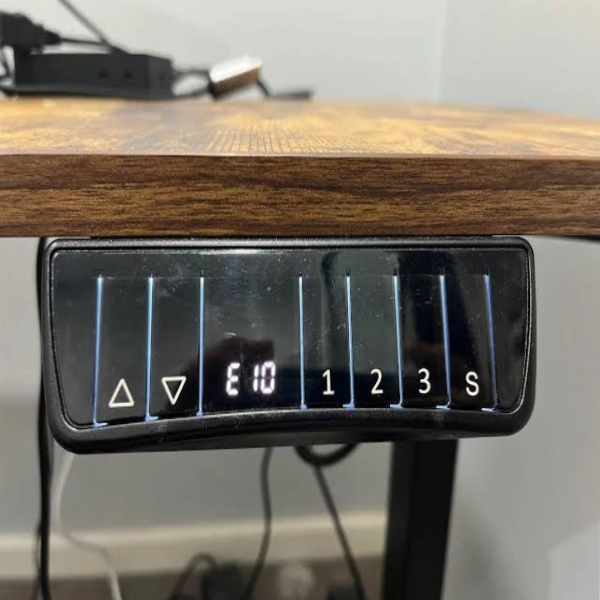
If a page tells you your VIVO desk is showing one of these, that page is about a different brand.
- E01, E03 through E09. VIVO's only E0x code is E02
- ASR. Not found in any VIVO manual
- RST. VIVO uses RES, rES or res depending on the model. These are all the same state, VIVO is just inconsistent with its own capitalisation
- Triple dash. VIVO's cable code is a single dash. S-- does exist but it is the function menu entry state, not an error
- A height or travel limit setting. VIVO does not document one anywhere. Its only programmable functions are memory presets, units, brightness, child lock and collision sensitivity
The reset: five procedures, use the one for your controller
In every version the button is the down arrow. What changes is the hold time, whether you need to unplug first, and what the display shows.
Variant A: DESK-V122EB/EW (S key, 3 memory)
Press and hold the down arrow for 5 seconds. The screen will show RES. Keep holding until the desk goes to its lowest level, then lifts back up slightly.
Variant B: DESK-V102E and DESK-V100EBY (includes a power cycle)
1. Unplug the desk for 10 seconds, then plug it back in
2. Lower the desk to its lowest position
3. Press and hold the down arrow for 10 seconds. The display will show rES and the legs will move to their lowest setting
4. When the desk stops lowering, release the button
Variant C: DESK-E155TB, DESK-E1L94B, DESK-V103E (simplest)
Press and hold the down arrow. The panel displays RES. Keep holding until the desk lowers all the way and then raises slightly. Done.
Variant D: DESK-V100EB/W, the two button controller with no display
1. Unplug the desk for 30 seconds, then plug it back in
2. Press and hold the down arrow until the desk reaches its lowest position and then rebounds up slightly
3. Release only after the rebound
The detail that catches people out: VIVO documents a delay of up to 10 seconds between the desk bottoming out and the rebound. If you release during that silence, the reset does not complete and the desk seems dead. Keep holding.
Variant E: DESK-V123EB/EW (M key, multi motor corner)
With the unit powered on, press the down arrow until the desk is fully lowered. Then press and hold the down arrow for 5 seconds, or until rES appears. The desk lowers fully, moves back up slightly, and returns to normal operation.
Variant F: DESK-E151EB/W
Press the down arrow until the desk is fully lowered. Then press and hold the down arrow. RES appears, the leg lowers and rebounds upward. Release and the frame is reset.
My desk is stuck at its lowest position and will not come up
This is the single most common VIVO complaint and it is usually not a fault.
VIVO documents it directly for the DESK-V100EBY: if the desk is stuck at the lowest position, the reset process may have been triggered accidentally while lowering it. The fix is to finish the reset, not to escape it.
What to do: press and hold the down arrow for 10 seconds until rES is no longer displayed. The desk will rebound slightly, which means the reset completed. Now it will move normally again.
People instinctively let go and start pressing up, which leaves the desk mid-reset and unresponsive. Hold it through.
Anti-collision sensitivity: the setting that stops repeat E02 errors
VIVO calls it Collision Force Detection, shown as CF. Four settings on every model: OFF, L for low, N or n for normal, and H for heavy.
If your desk throws E02 constantly on an uneven floor, or when carrying a heavy monitor arm, changing this is the actual fix. A reset will not stop it happening again.
On S key controllers (V122EB, V103E)
Long press S until the screen shows S--, then release. Short press S again and UN appears. Use the arrow keys to switch to CF, short press S to select. Use the arrows to choose OFF, L, N or H. Short press S to save.
On number key controllers (V102E, V100EBY, E151EB)
Press and hold buttons 1 and 4 together for 2 seconds until the display shows H. Press up or down to choose OFF, L, n or H. Wait 2 seconds and the setting saves itself.
On the M key controller (V123EB)
Hold M for 3 seconds until S -- flashes. Press M again to enter Function mode. Press up or down until CF appears, press M to select. Choose your setting with the arrows, then hold M for 2 seconds to save. Note that Function mode times out after 20 seconds of inactivity.
One warning: setting CF to OFF removes the safety stop entirely. The desk will keep driving into whatever is in its way, including a chair arm, a drawer or a person. Low is the sensible setting for a false trigger problem.
The desk will not move at all
VIVO does not publish a diagnostic order, so here is one assembled from the causes it does document.
1. Display completely dark? Touch any button. The V123EB enters power saving mode after 2 minutes idle and looks dead
2. Showing LOC? That is the child lock. Hold buttons 1 and 2 for 2 seconds
3. Showing a single dash? Cable disconnection. Unplug, disconnect all cables, wait 5 minutes, reconnect, restore power, then reset
4. Showing HOT? Wait 15 to 18 minutes and do not touch the plug (see the warning below)
5. No display and a two button controller? Confirm the AC adapter connection, then run Reset Variant D
6. Check the cable seating at the control box. There are usually three connections: the AC adapter, the cable from the nearest leg, and the extension cable running to the furthest leg. VIVO calls this Protection Mode, where disconnected cables stop the desk entirely
7. Still nothing, contact VIVO support
The safety contradiction VIVO never reconciles
The DESK-V123EB manual carries this note: do not remove or reconnect power to reset the unit when in a protective or HOT state, as this may damage the electronics.
But several of VIVO's own error fixes begin with unplugging, and Reset Variant B starts with a 10 second power cycle. The safe reading is straightforward: if the display says HOT, let it finish cooling before you do anything involving the plug. Once it clears, the normal procedures apply.
The control box must be screwed down
The DESK-V123EB manual states twice that the control unit has a gyroscope sensor and must be fixed to the desk for correct operation.
A control box left dangling from the underside during assembly will misread tilt and produce phantom E02 stops that no reset will cure. If yours is hanging loose, mount it properly before troubleshooting anything else.
Uneven legs: does the reset fix it?
VIVO is inconsistent here, so it depends on your model.
| Model | VIVO's stated fix for E60 |
| DESK-V123EB/EW | Reset the desk to align the legs |
| DESK-V122EB/EW | Unplug and physically re-level the legs per assembly STEP 2, then restore power |
| DESK-V103E | Unplug and re-level per assembly STEP 3, then restore power |
| All other frames | No E60 code and no documented uneven leg handling |
Mechanically the reset does re-sync the legs, because every variant drives both legs down to the hard bottom stop before rebounding. But VIVO only states that purpose for the V123EB, so on the V122EB and V103E follow their instruction and check the legs physically first.
Memory presets (and why H1 is not an error)
If your display shows H1, H2, H3 or H4, that is a save confirmation, not a fault.
| Model | How to save a preset |
| DESK-V122EB | Set the height, short press S. When S - flashes, press a memory key. 3 presets |
| DESK-V103E | Set the height, quick press S, then press 1, 2 or 3 |
| DESK-V102E / V100EBY | Set the height, press and hold the memory button until H1 displays. 4 presets |
| DESK-E155TB / E1L94B | Set the height, press and hold the number key. H1, H2 or H3 shows for 3 seconds. 3 presets |
| DESK-E151EB | Set the height, hold button 1 for 5 seconds until H1 appears. 4 presets |
| DESK-V123EB | Press M, the height flashes, then press 1 to 4 within six seconds. 4 presets |
Warranty and getting parts
- VIVO lists a 3 year warranty on its electric desk frames on the product pages. Its policy page only says the period varies by category, so check your own model's listing
- Covers product defects, not user error. Applies to items bought from VIVO or a registered VIVO vendor on an affiliated marketplace
- Used items get a strict 30 day limited warranty
- Damaged, defective or missing parts must be reported within 30 days of delivery to be replaced at no cost. Reporting later can mean the claim is denied
- Returns need an RMA number. There is a 30 day return window, with return shipping at your cost for change of mind
- Contact: 309-278-5303 extension 1, help@vivo-us.com, or live chat. Monday to Friday 7am to 7pm CST, Saturday 8am to 4pm CST
VIVO's manuals repeat the line Contact Us First, Do Not Return Item. For a missing bolt or a dead controller that is the faster route than a return.
FAQ
How do I reset my VIVO standing desk?
Hold the down arrow until the desk bottoms out and rebounds. The exact hold time and whether you unplug first depends on your controller, so use the matching variant above. Most models show RES or rES while resetting.
What does E02 mean on a VIVO desk?
Vibration, collision or incline was detected and the desk stopped. Check for obstructions. If there are none, reset the desk, and if it keeps happening lower the Collision Force Detection setting to L.
Why is my VIVO desk stuck at the bottom?
A reset was probably triggered by accident while lowering it. Hold the down arrow for 10 seconds until rES clears and the desk rebounds slightly. That completes the reset and normal movement returns.
What does LOC mean?
Child safety lock. Hold buttons 1 and 2 together for 2 seconds to toggle it off.
Can I set a height limit on a VIVO desk?
VIVO does not document a height limit feature on any model. The programmable settings are memory presets, units, brightness, child lock and collision sensitivity. Do not follow limit-setting instructions written for other brands.
How long does the HOT error last?
VIVO says 15 minutes on most models and 18 minutes on others. Wait 18 minutes and do not unplug it while it is cooling.
Bottom line
Almost every VIVO desk problem is one of four things: the child lock, a loose cable, a reset that was started and not finished, or a collision sensitivity setting that is too aggressive for your floor. None of those are faults, and none need a replacement part.
Identify your controller, use the matching reset, and if E02 keeps returning change the CF setting rather than resetting over and over. If the desk still does not respond after that, report it inside the 30 day window and VIVO will send parts.
Did you like our blog?
Comments (0)
All comments are reviewed and approved by an admin before appearing publicly.
No comments yet - be the first to share your thoughts.